


| App Name | App Ops |
| Developer | Xingchen & Rikka |
| Category | Tools |
| Size | 9.90M |
| Latest Version | 9.0.7.r1708.57e6ad70 |
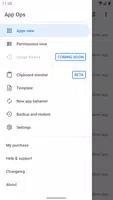


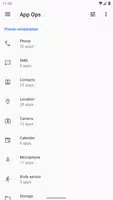


App Ops is a powerful tool designed to help Android users manage app permissions effectively, enhancing both privacy and security. With its intuitive interface, users can easily control which permissions each app on their device can access, ensuring they have complete control over their data and device functionality.
Features of App Ops:
Support for Non-Rooted Devices: Even without rooting your device, you can utilize App Ops. Simply connect your phone to a computer and use adb to manage permissions, making it accessible to a broader audience.
Multi-User and Work Profile Support: App Ops allows you to manage permissions for different users or work profiles on your device. This feature is perfect for those who share their devices or need to maintain separate professional and personal profiles.
Tips for Users:
Grant or Deny Specific Permissions: Use App Ops to tailor permissions for each app, granting access only to the data and features necessary for the app's function. This practice significantly boosts your privacy.
Improve Battery Life: By limiting background activities and location access for certain apps, App Ops can help extend your device's battery life, ensuring you stay powered up longer.
Regular Permission Reviews: It's crucial to periodically review and update the permissions you've granted through App Ops. This ensures your data remains secure and your settings reflect your current needs.
Conclusion:
App Ops empowers you to take command of your device's app permissions, enhancing your privacy and security. Whether you're a casual or a power user, App Ops offers features tailored to your needs. Download App Ops today and unlock your device's full potential!
What's New in the Latest Version 9.0.7.r1708.57e6ad70.G
Aug 7, 2023
Due to word limit, please view the changelog from our website.
-
TechBitJul 26,25Really useful app for managing permissions! The interface is clean and easy to navigate. I feel much more in control of my privacy now. Only wish it had a dark mode. 😊Galaxy S20
-
 2025 Gacha Games: Full Release List
-
 Azure Latch Codes (March 2025)
-
 Black Ops 6 Zombies: How To Configure The Summoning Circle Rings on Citadelle Des Morts
-
 Roblox: SpongeBob Tower Defense Codes (January 2025)
-
 Persona 5: Phantom X Playtest Leaks on SteamDB
-
Chimera Clan Boss Guide: Top Builds, Masteries, and Gear for RAID: Shadow Legends