

Home > Apps > Productivity > go.edustar

| App Name | go.edustar |
| Developer | N. Harris Computer Solutions |
| Category | Productivity |
| Size | 1.90M |
| Latest Version | 1.0 |
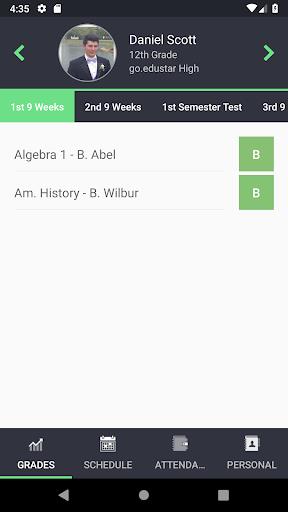
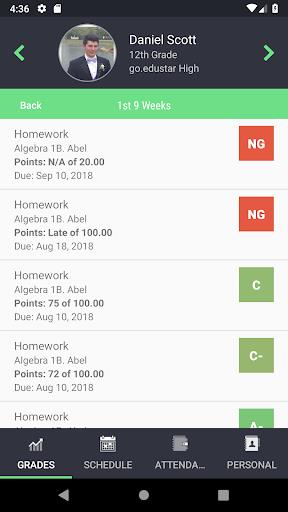
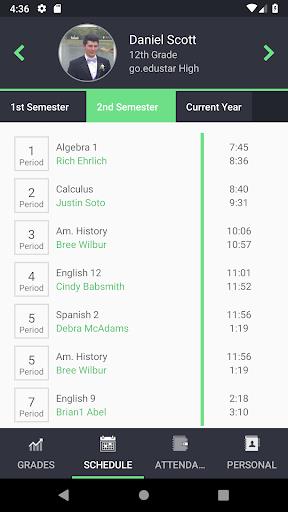
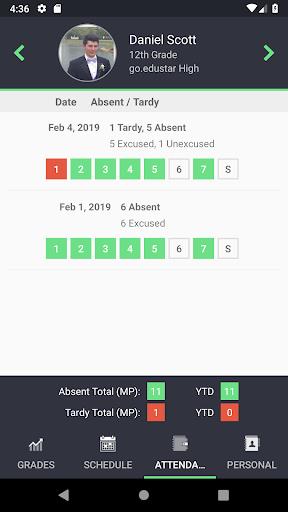


Stay connected with your child's academic journey with the go.edustar app, a powerful tool designed to keep parents and guardians well-informed. With this app, you can effortlessly access your child's grades, assignments, due dates, schedule, attendance, and even demographic information all in one place. It's the perfect solution for those who wish to be actively involved in their child's education. By using your existing Parents On Line username and password, you can seamlessly view all your students' information, no matter which school they attend. Download the go.edustar app today to eliminate the guesswork and stay up-to-date with your child's academic progress.
Features of go.edustar:
Real-time Student Information
The go.edustar app offers parents and guardians instant access to their student's grades, assignments, due dates, schedules, attendance, and demographic information. This real-time feature ensures you have a comprehensive view of your child's academic journey, allowing you to stay informed and proactive about their educational progress.
Compatibility with Parents On Line
The app integrates smoothly with your existing Parents On Line credentials, making it user-friendly and convenient. With a single sign-on, you can access all your students' information across different schools, ensuring you're always connected to their educational path.
User-Friendly Interface
Navigating the go.edustar app is a breeze thanks to its intuitive interface. With clear and organized menus, you can quickly find and review grades, assignments, schedules, and more, all with just a few taps on your mobile device.
Notifications and Alerts
Never miss an important update with the go.edustar app's notifications and alerts. Customize your preferences to receive timely notifications about grade updates, upcoming assignments, and other critical information, ensuring you stay on top of your student's academic progress.
Tips for Users:
Set Up Notifications
To maximize your engagement with your child's education, customize your notification settings within the app. Choose to receive alerts for grade updates, attendance records, or upcoming assignments to ensure you're always in the loop.
Check Grades Regularly
Make it a routine to monitor your student's grades through the go.edustar app. Regular checks will help you identify areas where your child may need additional support, enabling you to provide timely encouragement and assistance for their academic success.
Communicate with Teachers
Leverage the app's messaging feature to maintain open communication with your child's teachers. Use it to ask questions, request meetings, or provide feedback, fostering a strong partnership between home and school that supports your student's educational goals.
Conclusion:
The go.edustar app is an essential tool for parents and guardians looking to stay engaged with their child's academic journey. With its real-time information, seamless integration with Parents On Line, user-friendly design, and customizable notifications, the app empowers you to support your student's success effectively. By following the provided tips, you can make the most of the app's features and ensure you have the necessary information and support to help your child thrive. Download the go.edustar app today and take an active role in your student's education.
-
 2025 Gacha Games: Full Release List
-
 Azure Latch Codes (March 2025)
-
 Black Ops 6 Zombies: How To Configure The Summoning Circle Rings on Citadelle Des Morts
-
 Roblox: SpongeBob Tower Defense Codes (January 2025)
-
 Persona 5: Phantom X Playtest Leaks on SteamDB
-
Chimera Clan Boss Guide: Top Builds, Masteries, and Gear for RAID: Shadow Legends