

Home > Apps > Personalization > Material Notification Shade

| App Name | Material Notification Shade |
| Category | Personalization |
| Size | 24.00M |
| Latest Version | v18.5.1 |
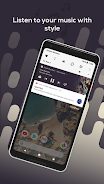
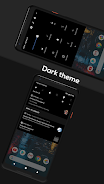
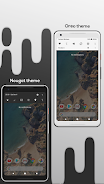
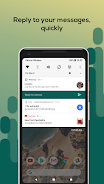


Material Notification Shade is an app that brings features from Android Oreo to your notification center and allows for a ton of customization. It replaces your stock notification panel and provides a custom quick settings menu with gesture detection. The app includes stock themes, full color customization, powerful notifications (read, snooze, dismiss), quick reply for Android 5.0 devices, automatic bundling of notifications, and notification card themes. The app also allows for customization of the quick settings panel including changing the background or foreground color, brightness slider color, and profile picture. Root access is optional but can grant access to control certain settings. The app uses the Accessibility Service API for a better user experience but does not collect personal information.
The Material Notification Shade app offers several advantages, including:
- Stock Themes: The app provides Nougat and Oreo-based themes, allowing users to choose the layout that best suits their preferences.
- Full Color Customization: Users have the ability to customize the color of all elements in the notification shade, making it personalized to their taste.
- Powerful Notifications: The app allows users to easily manage their notifications by providing options to get, read, snooze, or dismiss them.
- Quick Reply: Users can reply to messages quickly as soon as they receive them, without needing to navigate away from the notification center. This feature is compatible with Android 5.0 devices.
- Auto Bundled Notifications: Notifications from the same app are grouped together, making it easier for users to control and manage them.
- Notification Card Themes: Inspired by Android 8.0 Oreo, the app offers different notification card themes, including light, colored (using the notification's color as the background), and dark (blending notifications with a pure black background, ideal for AMOLED screens).
In addition to these advantages, the app also allows customization of the quick settings panel, such as changing the background/foreground color and the brightness slider color. Users can also choose their own profile picture to be displayed in the shade and change the quick settings grid layout. Root access is optional but can grant the app more control over certain settings. The app utilizes the Accessibility Service API to provide an enhanced user experience, without collecting any personal information or reading sensitive data from the screen.
-
AndroidTweakerMay 18,25This app completely transforms the notification shade – looks much cleaner now. Gesture support is smooth and the customization options are insane. If you're rooted and want full control over your UI, this is a must-have.Galaxy Note20 Ultra
-
RootMasterBRSep 16,24Transformou totalmente a experiência da barra de notificações do meu Android. As cores personalizáveis são incríveis e os gestos funcionam perfeitamente. Recomendo para quem gosta de personalizar o sistema.Galaxy S21
-
カスタム大好きおじさんSep 06,24通知画面が綺麗になり、ジェスチャー操作もできるようになって快適です。一部の機能は端末によって使えないこともあるので、事前に確認が必要かもしれません。iPhone 15 Pro
-
MovileroAug 29,24Mejoró mucho la interfaz de mi teléfono. El soporte de gestos es muy práctico y los temas personalizados quedan genial. Solo necesita más documentación para usuarios nuevos.iPhone 15 Pro Max
-
안드로이드러버Dec 12,23앱 자체는 기능이 많지만 설정이 복잡해서 초보자는 어려울 수 있어요. 제스처 인식이 가끔 먹히지 않기도 하고요. 문서나 설명이 좀 더 필요해 보여요.iPhone 15 Pro Max
-
 2025 Gacha Games: Full Release List
-
 Azure Latch Codes (March 2025)
-
 Black Ops 6 Zombies: How To Configure The Summoning Circle Rings on Citadelle Des Morts
-
 Roblox: SpongeBob Tower Defense Codes (January 2025)
-
 Persona 5: Phantom X Playtest Leaks on SteamDB
-
Chimera Clan Boss Guide: Top Builds, Masteries, and Gear for RAID: Shadow Legends