

Home > Apps > Productivity > Microsoft Word: Edit Documents

| App Name | Microsoft Word: Edit Documents |
| Developer | Microsoft Corporation |
| Category | Productivity |
| Size | 250.10M |
| Latest Version | 16.0.18025.20072 |
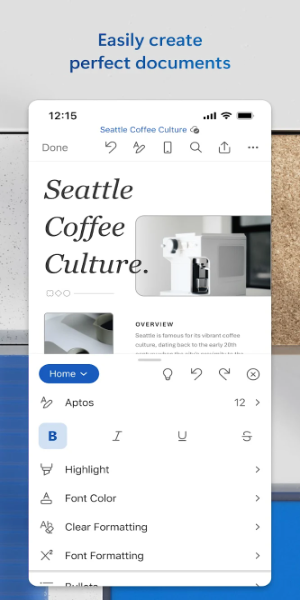



Effortlessly create and edit documents with Microsoft Word, your mobile writing solution. This app lets you draft and refine files as you would on a desktop. Benefit from features like PDF conversion, note sharing, and team collaboration, perfect for productivity on the move. Access, review, and share documents smoothly, staying organized anywhere.
Features of Microsoft Word: Document Editing:
⭐ Portable Convenience: Carry Microsoft Word anywhere and create or edit documents on your mobile device with the same ease as a PC.
⭐ Seamless Collaboration: Streamline teamwork with Word’s intuitive features. Edit, comment, and collaborate with others effortlessly.
⭐ Advanced Editing Tools: Leverage Word’s powerful editing options, including rich formatting and layout tools, for professional, polished documents.
⭐ Diverse Template Library: Choose from a wide selection of templates for resumes, cover letters, newsletters, and more to create standout documents.
⭐ Effortless File Sharing: Share documents and manage permissions with ease. Attach files as PDFs or docs, or copy them into emails.
FAQs:
⭐ Can I convert documents to PDF and back?
- Yes, Microsoft Word offers a built-in PDF converter for easy switching between document formats.
⭐ Can I edit documents offline?
- Yes, you can view, edit, and create documents on your device without an internet connection.
⭐ Can multiple users edit a document at the same time?
- Yes, collaborate in real-time with your team, tracking changes to text, formatting, and layout.
⭐ Can I access documents across devices?
- Yes, a free Microsoft account lets you access your documents on multiple devices, keeping your work at your fingertips.
Design and User Experience
Intuitive Interface
Microsoft Word delivers a user-friendly design mirroring the desktop version, with clear menus and icons for quick access to editing tools.
Fluid Document Editing
The app supports seamless editing with responsive touch controls, allowing easy text formatting, image insertion, and document adjustments on mobile.
Robust Collaboration Tools
Built-in sharing features enable real-time collaboration. Comments and track changes keep teams aligned and productive.
PDF Conversion
A simple PDF converter lets users switch between formats effortlessly, enhancing workflow flexibility.
Cross-Device Syncing
Documents sync automatically across devices, ensuring access to your work anytime, anywhere, for uninterrupted productivity.
Accessibility Features
Designed for inclusivity, Word offers voice commands, screen reader support, and adjustable text sizes for a comfortable user experience.
What's New
Thank you for choosing Word.
We frequently update the app with new features, improved speed, and enhanced reliability.
With a Microsoft 365 subscription, unlock the full potential of Office across all your devices. Discover exclusive offers in the app.
-
 2025 Gacha Games: Full Release List
-
 Azure Latch Codes (March 2025)
-
 Black Ops 6 Zombies: How To Configure The Summoning Circle Rings on Citadelle Des Morts
-
 Roblox: SpongeBob Tower Defense Codes (January 2025)
-
 Persona 5: Phantom X Playtest Leaks on SteamDB
-
Chimera Clan Boss Guide: Top Builds, Masteries, and Gear for RAID: Shadow Legends