


| App Name | zTranslate: Translate subtitle |
| Developer | zSoft.asia |
| Category | Lifestyle |
| Size | 12.30M |
| Latest Version | 1.34 |
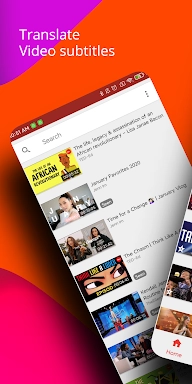
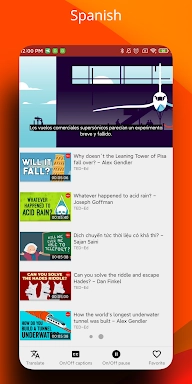
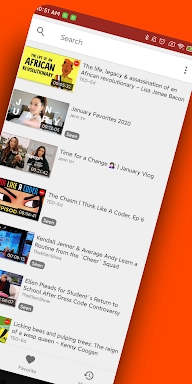


zTranslate is an innovative tool that effectively bridges language gaps in video content. With the capability to translate subtitles from their original language into more than 110 different languages, this app is ideal for international audiences and language learners alike. Key features include the ability to display dual subtitles for comparison, a dictionary lookup for individual words, and the advanced shadowing technique to enhance language acquisition.
Features of zTranslate: Translate Subtitles:
⭐ Multilanguage Support
This app provides subtitles in over 110 languages, enabling users to enjoy videos in their language of choice.
⭐ Language Learning Tool
Beyond simple translation, zTranslate offers a side-by-side comparison of original and translated subtitles, serving as an excellent resource for those learning a foreign language.
⭐ Dictionary Lookup Feature
Enhance your vocabulary effortlessly by tapping on unfamiliar words within the subtitles, which brings up instant definitions and translations.
⭐ Shadowing Technique
Leverage the shadowing technique provided by the app to improve your pronunciation and fluency in a new language, making learning both fun and effective.
FAQs:
⭐ Is this app free to use?
Yes, zTranslate is free to download and use, with no hidden fees or subscriptions required.
⭐ Can I use this app offline?
Absolutely, users can download videos with subtitles for offline viewing, perfect for practicing language skills on the go.
⭐ How accurate are the translations?
zTranslate employs cutting-edge translation technology to deliver accurate and precise subtitles across multiple languages.
How to Use This App:
Download and Install: Obtain zTranslate from your device's app store.
Open the App: Start the app and select the video or YouTube content you want to watch.
Search for Videos: Utilize the in-app search function to locate videos with available subtitles.
Choose Subtitle Language: Pick the original language of the subtitles and the language you wish to have them translated into.
Translate Subtitles: The app will quickly process and translate the subtitles in real-time.
Compare Subtitles: Make use of the dual display feature to compare the original and translated subtitles.
Use the Dictionary: Simply tap on any word for a quick definition or translation.
Shadowing Technique: Enhance your pronunciation by shadowing the audio after hearing it, which is particularly beneficial for language learning.
Adjust Settings: Customize the appearance of subtitles and other app settings according to your preferences.
Favorites: Save videos to your favorites list for quick and easy access later on.
-
 2025 Gacha Games: Full Release List
-
 Black Ops 6 Zombies: How To Configure The Summoning Circle Rings on Citadelle Des Morts
-
 Roblox: SpongeBob Tower Defense Codes (January 2025)
-
 Azure Latch Codes (March 2025)
-
 Persona 5: Phantom X Playtest Leaks on SteamDB
-
Chimera Clan Boss Guide: Top Builds, Masteries, and Gear for RAID: Shadow Legends